
You can now personalise your ISMS.online platform by setting a custom subdomain. Instead of logging in via platform.isms.online, your organisation can access the platform at <yourcompany>.isms.online.
This helps tailor the platform to your organisation and makes user management easier. With custom subdomains, users can use the same email address across multiple platforms—removing the “email address already in use” error. This is especially useful when working with consultants or auditors who already have access to other ISMS.online platforms.
How to Set Up a Custom Subdomain
Note: You must be a Platform Administrator to complete this action.
- Go to Organisation settings.
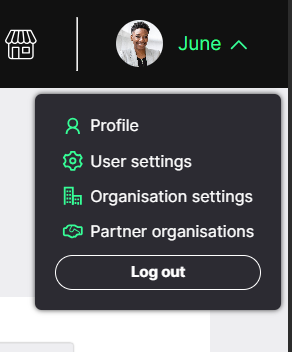
- Select Security settings.
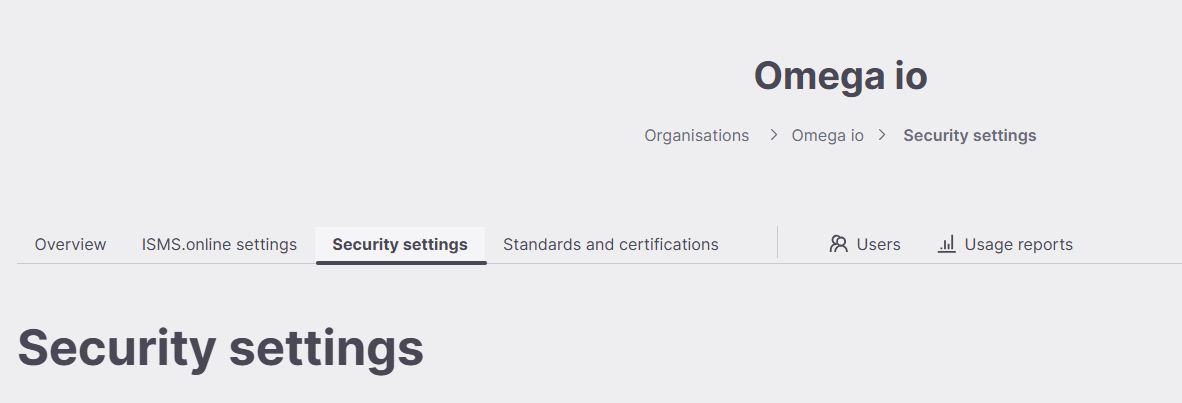
- Under Login URL, enter your custom subdomain.

- Click Save.
Once saved, you and your colleagues can log in directly using your new custom subdomain.
If You Already Have SSO Enabled
If SSO is enabled on your platform, you may see a message when setting your subdomain.
If this happens, please contact us via live chat or email support@isms.online and we’ll help you update your subdomain.

A few things to be aware of:
- URLs in Note content
Changing the domain will also make some URLs in Note content require updating. Linked work, and default content links are added in a dynamic manner that will be fine (if you inspect the link within the note you'll see if doesn't include the platform details as it's what we call a Dynamic URL)
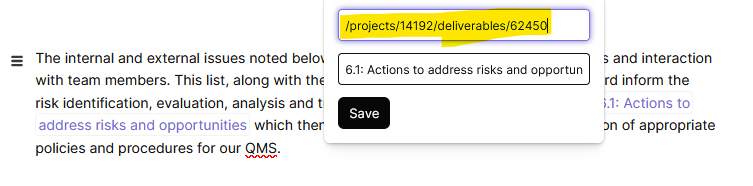
Any internal links that have been pasted as the full URL, will either need to be updated to reflect the new URL, or amended to be a dynamic link as above.
- Risk Methodology link
Changing the URL will also impact the risk methodology link.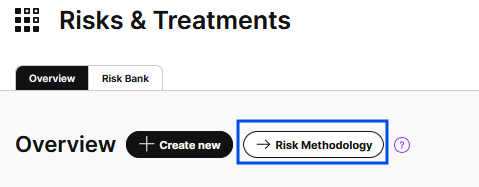
To update this click into the Risk map Settings: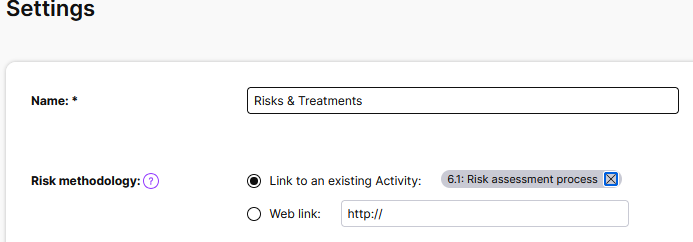
You can either change it to a Automatic link with the top option, or update the weblink on the second - this requires the full URL to be included (for cases where it points to external sites)